
Skip to content
Skip to comparison
Comparison

BitStat vs TraderSync

BitStat may fit if you want to journal manually first, then connect supported accounts through Premium.

BitStat

BitStat
Premium

$12 /month

TraderSync
Pro

$29.95 / mo.

Who it fits

Which trading journal best fits your trading?

BitStat

BitStat is a good fit if you want to bring supported exchange and MT5 accounts together and analyze completed trades in one journal. It also offers manual strategy backtesting on historical data with price replay.

TraderSync

TraderSync is a good fit if you need Market Replay to practice and test strategies. It’s available on Pro, Premium, and Elite; data granularity depends on the plan.

What this comparison covers

Manual journaling and account limits

Check compatibility for all five accounts

Before syncing, check whether each exchange and broker account type is supported.

Features

Plans, accounts, and historical data tools

Plans, accounts, and historical data tools
CriteriaBitStatTraderSync
Ongoing free manual planManual journaling, basic stats, equity, and P&LBasic: unlimited manual entries and P&L dashboard
7-day trialPremium: 7 days, no credit card requiredPro, Premium, and Elite: 7 days, no credit card required
TraderSync Pro accountsUnlimited supported connections5
More than five accountsSupported connections on one Premium planFor 6+ accounts, check the Premium or Elite limit
Working with historical dataManual backtesting: replay price movements, simulated trades, P&L, and drawdownMarket Replay is available on Pro, Premium, and Elite; data granularity depends on the plan
Pricing

Plans and pricing for BitStat and TraderSync

BitStat

Free

$0

Free plan with no time limit

  • Manual trading journal
  • Basic stats
  • P&L and equity overview

Premium

$12 /month

The monthly price is a current offer. The annual plan costs $96. You can try Premium for 7 days without a card.

  • Unlimited supported connections
  • Automatic syncing for supported accounts

TraderSync

Basic

$0 / mo.

Free plan for manual journaling

  • Unlimited manual entries
  • Up to 30 file-imported executions per calendar month
  • P&L dashboard

Pro

$29.95 / mo.

Standard monthly price; discounts and promo codes apply to annual plans.

  • Five accounts
  • Cypher Assistant for trade analysis
  • Market Replay
  • TraderSync analytics tools

Premium

$49.95 / mo.

Standard monthly price; discounts and promo codes apply to annual plans.

  • Cypher Assistant for trade analysis and trade plan preparation
  • Market Replay
  • TraderSync analytics tools

Elite

$79.95 / mo.

Standard monthly price; discounts and promo codes apply to annual plans.

  • Cypher Coach tools and 60 messages per day
  • Market Replay and options strategy testing
  • Level II and Time & Sales market analysis tools

How to read this comparison

Prices checked on November 26, 2026. BitStat at $12/mo. is a current offer; TraderSync Pro is $29.95/mo. at the standard price. Annual discounts are excluded; taxes may apply separately.

In practice

How BitStat differs from TraderSync in practice

Five accounts with monthly billing

For five supported accounts, BitStat Premium currently costs $12/mo., while TraderSync Pro costs $29.95/mo. The difference is $17.95 before taxes.

In this setup, TraderSync Pro supports all five accounts. Adding a sixth supported connection to BitStat doesn’t change the plan.

Before subscribing, check the TraderSync Premium or Elite limit for a sixth account.

5 accounts; Pro standard monthly price

BitStat Premium

$12/ month

TraderSync Pro

$29.95/ mo.

Monthly difference$17.95

Period summary and the reason behind an individual trade

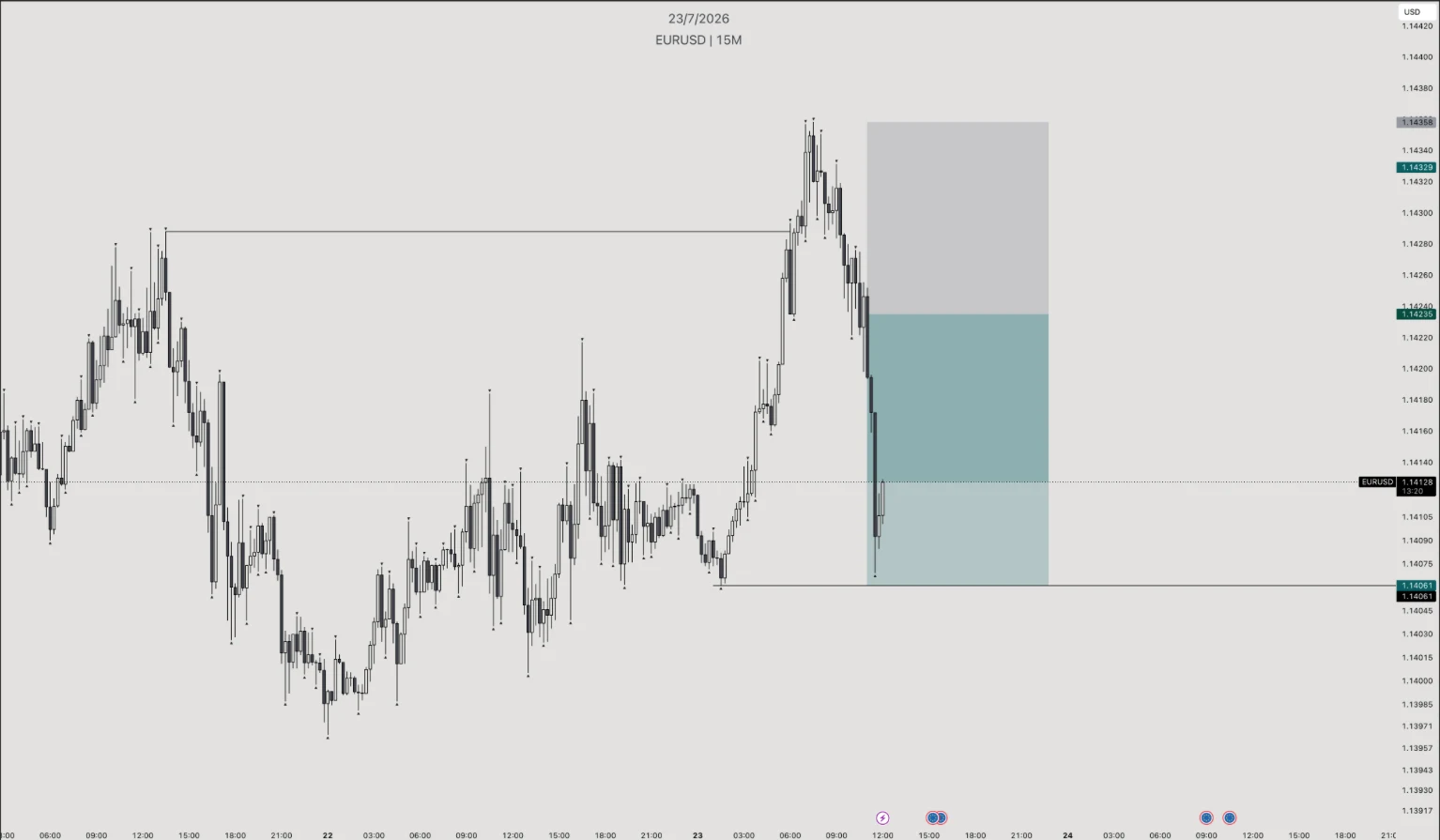
In BitStat, compare Win Rate with average profit and loss, drawdown, and equity. Add a note and chart screenshot to a trade so you can see the result alongside your own explanation.

Saved note “EU Short” for a trade dated July 23, 2026Attached 15-minute EURUSD chart with the trade position marked
EURUSD · Short · London · July 23, 2026

Different tools for working with historical data

BitStat backtesting runs a test session on historical data: replay price movements, place simulated trades, and analyze P&L and drawdown. TraderSync Market Replay recreates historical market sessions for practice and strategy testing. It’s available on Pro, Premium, and Elite; data granularity depends on the plan.

Historical data

BitStat

Manual strategy backtesting

TraderSync

Market Replay on Pro, Premium, and Elite

Start with a free journal

TraderSync Basic offers a free manual journal. BitStat Free includes notes, screenshots, basic stats, P&L, and equity indefinitely; Premium is required for API syncing of supported accounts.

Manual start

BitStat

Ongoing Free plan with notes and screenshots

TraderSync

Basic with unlimited manual entries

Bring crypto and broker accounts together

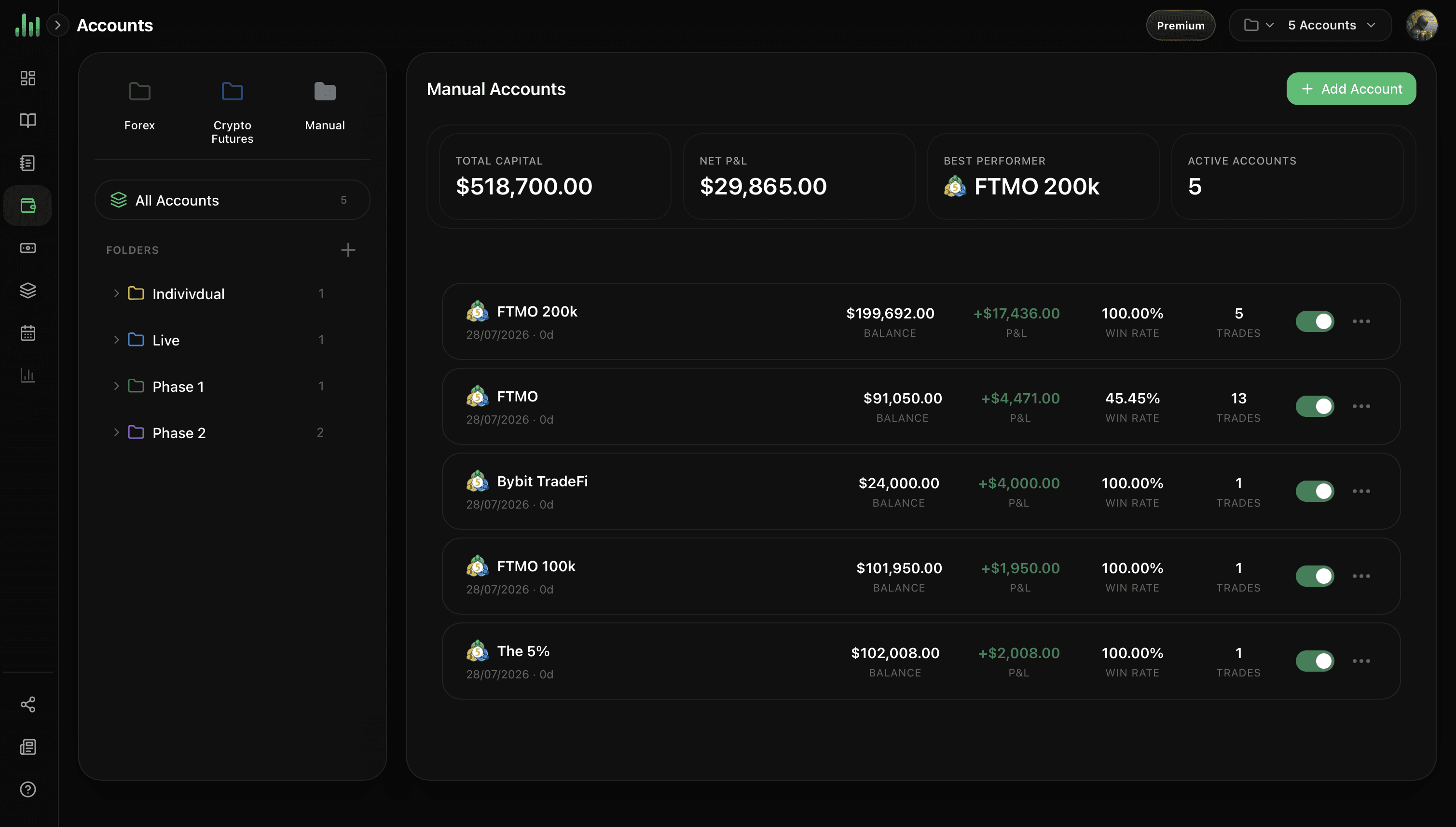
Bring supported exchange and MT5 accounts together in one journal; check compatibility for your specific exchange, account type, and market before syncing.

BitStat trading accounts with balances and performance
Choose an account and date range for a shared review
Weekly review

How to review a month across multiple sources

Choose one date range for an exchange and MT5 account, compare P&L, then open the trades that had the biggest impact on the result.

  1. Choose the same date range for each account.
  2. Check which entries and accounts are included in the analysis.
  3. Add a note to the trade that had the greatest impact on the result.
Four trades in the BitStat journal showing dates, instruments, and results
Example from the BitStat trade journal
Switching

Reconcile your data before fully switching

Before switching, check which sources BitStat supports and what you can export from TraderSync.

  1. Save the original files and record the execution count for a reference month.
  2. On a small sample, compare the date and time, instrument, side, volume, commissions, and result with the source.
  3. Check for duplicates, missing trades, and how partial fills are displayed.

Add your other supported accounts to BitStat Premium. Your subscription price stays the same.

FAQ

Frequently asked questions

Is Market Replay included with TraderSync Pro?
Yes. Market Replay is available on TraderSync Pro, Premium, and Elite. Data granularity depends on the plan.
Is manual backtesting available in BitStat?
Yes. Create a session on historical data, replay price movements, place simulated trades, and analyze P&L and drawdown.
Is five accounts the limit for all of TraderSync?
TraderSync Pro includes five accounts. Before subscribing for a sixth, check the limit on the Premium or Elite plan you choose.

Review your trades in BitStat

Journal trades manually on Free. When you need automatic syncing, connect supported accounts on Premium.