
Skip to content
Skip to comparison
Comparison

BitStat vs Scope360

With the current offer, BitStat Premium lets you connect four accounts for $12 per month. Scope360 Base costs $20 per month and covers up to three accounts.

BitStat

Scope360

BitStat
Premium

$12 /month

Scope360
Base

$20 / mo.

Who it fits

Which trading journal best fits your trading?

BitStat

BitStat is a good fit if you want a manual Free plan and one Premium plan for any number of supported accounts. BitStat also offers manual strategy backtesting on historical data.

Scope360

Scope360 is a good fit if Base (up to 3 accounts) or Pro (up to 10) meets your needs.

What this comparison covers

Cost for four accounts

BitStat also has a Free plan for manual journaling with no time limit.

Do you need automatic syncing?

The ongoing Free BitStat plan works for manual journaling. For automatic syncing, compare account limits on the paid plans.

Features

Plans and pricing for common use cases

Plans and pricing for common use cases
CriteriaBitStatScope360
Manual journaling at no costFree with no time limit: trades, notes, chart screenshots, basic stats, equity, and P&LManual Free plan available; see Scope360’s current pricing for terms and limits
Entry-level paid planPremium $12/mo. at the current offer; $96/yearBase $20/mo.; up to 3 accounts
Four connected accountsPremium $12/mo. at the current offer; unlimited supported connectionsPro $45/mo.; up to 10 accounts
Special offer for OKXAPI syncing is available on Premium; Free manual journaling is available separatelyOne OKX account for $0 when you sign up for OKX through a Scope link
Pricing

Plans and pricing for BitStat and Scope360

BitStat

Free

$0

Free plan with no time limit

  • Manual trading journal
  • Basic stats
  • P&L and equity overview

Premium

$12 /month

The monthly price is a current offer. The annual plan costs $96. You can try Premium for 7 days without a card.

  • Unlimited supported connections
  • Automatic syncing for supported accounts

Scope360

Base

$20 / mo.

Up to 3 connected accounts.

  • Monthly billing
  • Up to 3 connected accounts

Pro

$45 / mo.

Up to 10 connected accounts.

  • Monthly billing
  • Up to 10 connected accounts

How to read pricing

Prices checked on November 24, 2026. Cards show monthly plans; BitStat at $12/mo. is a current offer.

In practice

How BitStat differs from Scope360 in practice

What changes with four accounts?

For four supported accounts, Scope360 requires Pro at $45/mo. With the current offer, BitStat Premium costs $12/mo., a difference of $33 per month.

4 supported accounts: Premium at $12/mo. vs. Scope360 Pro at $45/mo.

BitStat Premium

$12/ month

Scope360 Pro

$45/ mo.

Monthly difference$33

Free manual journal in BitStat

BitStat Free has no expiry: manually enter trades, add notes and chart screenshots, and review basic stats, equity, and P&L. API syncing for supported accounts is available on Premium.

Upgrade to Premium when you need syncing for supported accounts.

Check the separate OKX offer terms

Scope360 offers one OKX account for $0 if you sign up through a Scope link; this does not change the prices of Base and Pro for other accounts.

Keep the decision context with the result

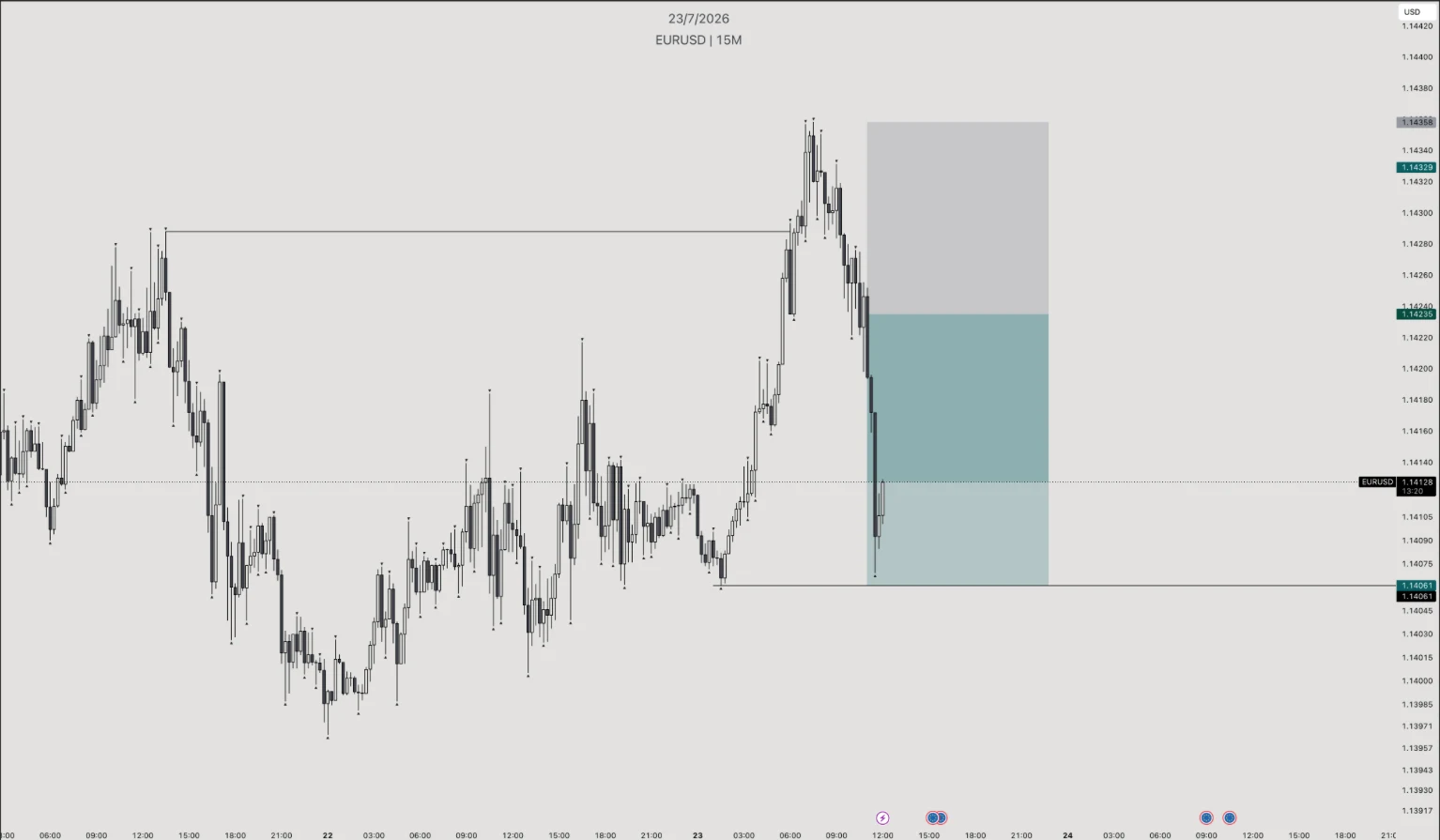
A journal helps you not only summarize a period but also remember why you opened a particular position. In BitStat, you can add a note and chart screenshot to a record, then analyze the trade’s result alongside P&L.

  • Record your plan and entry context.
  • Add a chart to preserve the market picture at the time of the decision.
  • After closing, compare the result with your original plan.
Saved note “EU Short” for a trade dated July 23, 2026Attached 15-minute EURUSD chart with the trade position marked
A note and chart screenshot stay alongside the trade record.
Weekly review

Start with manual entries and expand your workflow as needed

Start with manual entries on Free; connect compatible accounts on Premium for automatic data collection.

  1. Record a trade

    Save the instrument, result, note, and chart screenshot.

  2. Review the period

    Compare journal entries, stats, and P&L.

  3. Connect an account

    Check whether the source is compatible and activate Premium if you need syncing.

Four trades in the BitStat journal showing dates, instruments, and results
Example from the BitStat trade journal
Switching

Transfer your history and verify the data

First transfer one completed period and reconcile it with the original journal.

  1. List the accounts and dates you need.
  2. Match each source to a supported integration or enter trades manually.
  3. Compare trade count, time, side, volume, commissions, and P&L.
  4. Check for duplicates and keep the original report for reconciliation.
FAQ

Frequently asked questions

Can I sync accounts on BitStat Free?
No. Free is for manual journaling; automatic syncing of supported accounts is available on Premium.

Start journaling in BitStat for free

Journal trades manually on Free, with no time limit. When you need automatic syncing, connect supported accounts on Premium.