
Skip to content
Skip to comparison
Comparison

BitStat vs Edgewonk

With BitStat Free, you can journal trades, save notes and screenshots, and track P&L. Automatic account syncing is available on Premium.

BitStat

Edgewonk

BitStat
Premium

$12 /month

Edgewonk
Monthly plan

$26.25 / mo.

Who it fits

Which trading journal best fits your trading?

BitStat

BitStat is a good fit if you want to keep a note and chart alongside each trade’s result, and sync accounts as needed. You can test strategies with manual backtests on historical data.

Edgewonk

Edgewonk is a good fit if you regularly use its psychology reports and Tiltmeter.

What this comparison covers

Manual journaling or psychology reports

Automatic syncing of supported BitStat accounts is available on Premium.

Try the manual journal with one period

Take your last trading week and see whether manual entries, notes, and stats give you enough for a review. You can add syncing for supported accounts with Premium.

Features

Plans and features compared

Plans and features compared
CriteriaBitStatEdgewonk
Free planManual journaling, basic stats, equity, and P&LNo Free plan listed in Edgewonk’s public pricing
Number of accountsUnlimited compatible connections on PremiumUnlimited accounts and journals
Building disciplineTrade notes and personal explanationsPsychology analysis and Tiltmeter
Pricing

Plans and pricing for BitStat and Edgewonk

BitStat

Free

$0

Free plan with no time limit

  • Manual trading journal
  • Basic stats
  • P&L and equity overview

Premium

$12 /month

The monthly price is a current offer. The annual plan costs $96. You can try Premium for 7 days without a card.

  • Unlimited supported connections
  • Automatic syncing for supported accounts
Edgewonk

Monthly plan

$26.25 / mo.

With code BF26; standard price is $35 / mo. Excluding VAT.

  • Unlimited accounts and journals
  • Psychology analysis and Tiltmeter
  • Full access to all Edgewonk features

Annual plan

$147.75 / year

With code BF26; standard price is $197 / year. Excluding VAT.

  • Unlimited accounts and journals
  • Psychology analysis and Tiltmeter
  • Full access to all Edgewonk features

How to read this comparison

Prices checked on November 26, 2026. Edgewonk prices in the cards exclude VAT.

In practice

How BitStat differs from Edgewonk in practice

Compare the cost of a monthly journal

With monthly billing, Edgewonk with code BF26 costs $14.25 more than the current BitStat offer.

Pay monthly; unlimited accounts

BitStat Premium

$12/ month

Edgewonk Monthly plan

$26.25/ mo.

Monthly difference$14.25

Discipline starts with specific records

Add a note and screenshot to a trade in BitStat. After the session, compare your explanation with the time, instrument, and actual result; that way, you can revisit the decision itself, not just the final P&L.

BitStat trade journal table with trading results and details
Notes and trade plan alongside the record

From period statistics to individual trade records

P&L, Win Rate, average profit and loss, and drawdown describe the period. A note and chart beside an individual trade preserve the context for reviewing it.

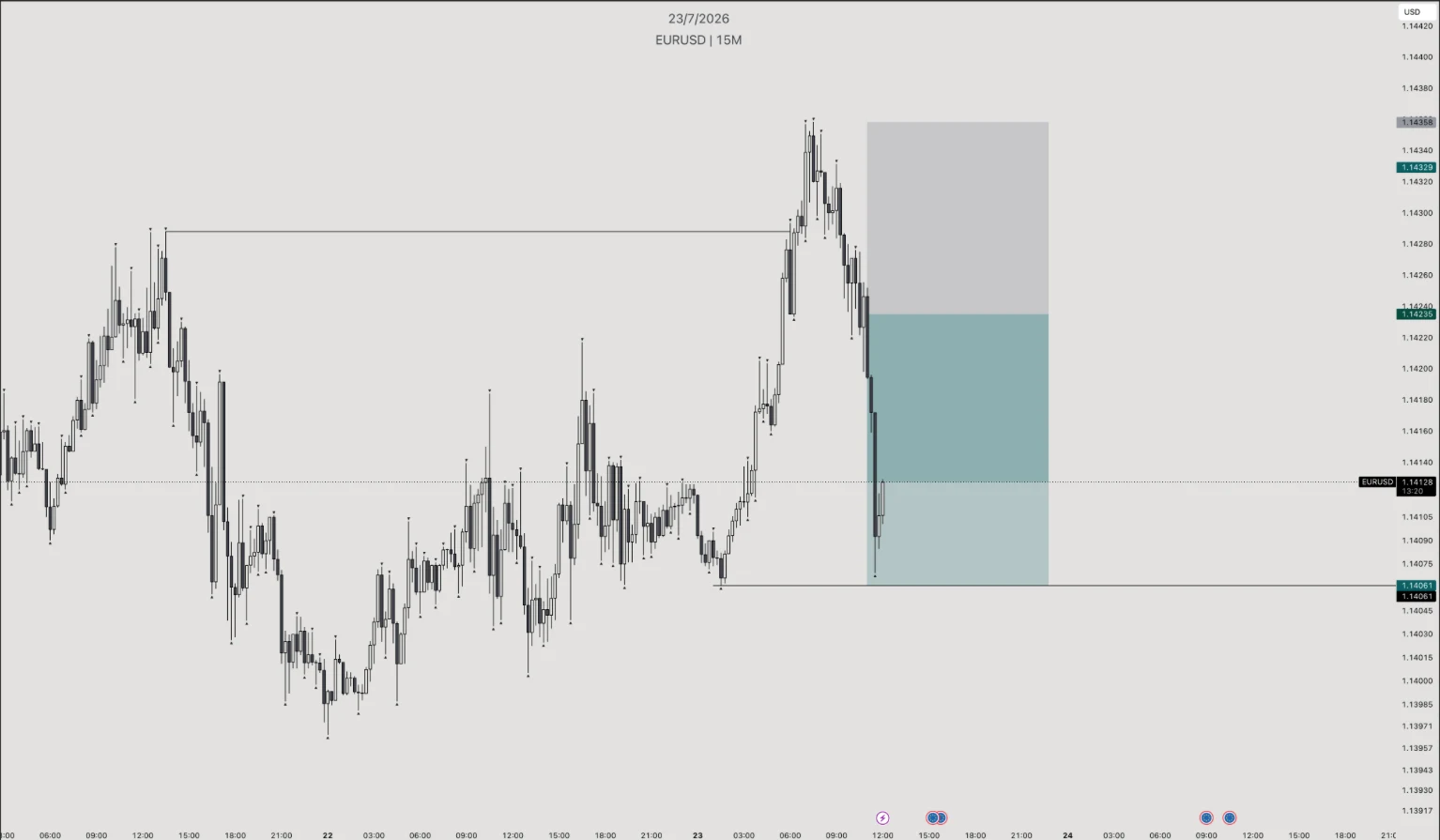
Saved note “EU Short” for a trade dated July 23, 2026Attached 15-minute EURUSD chart with the trade position marked
EURUSD · Short · London · July 23, 2026

Multiple accounts in one workflow

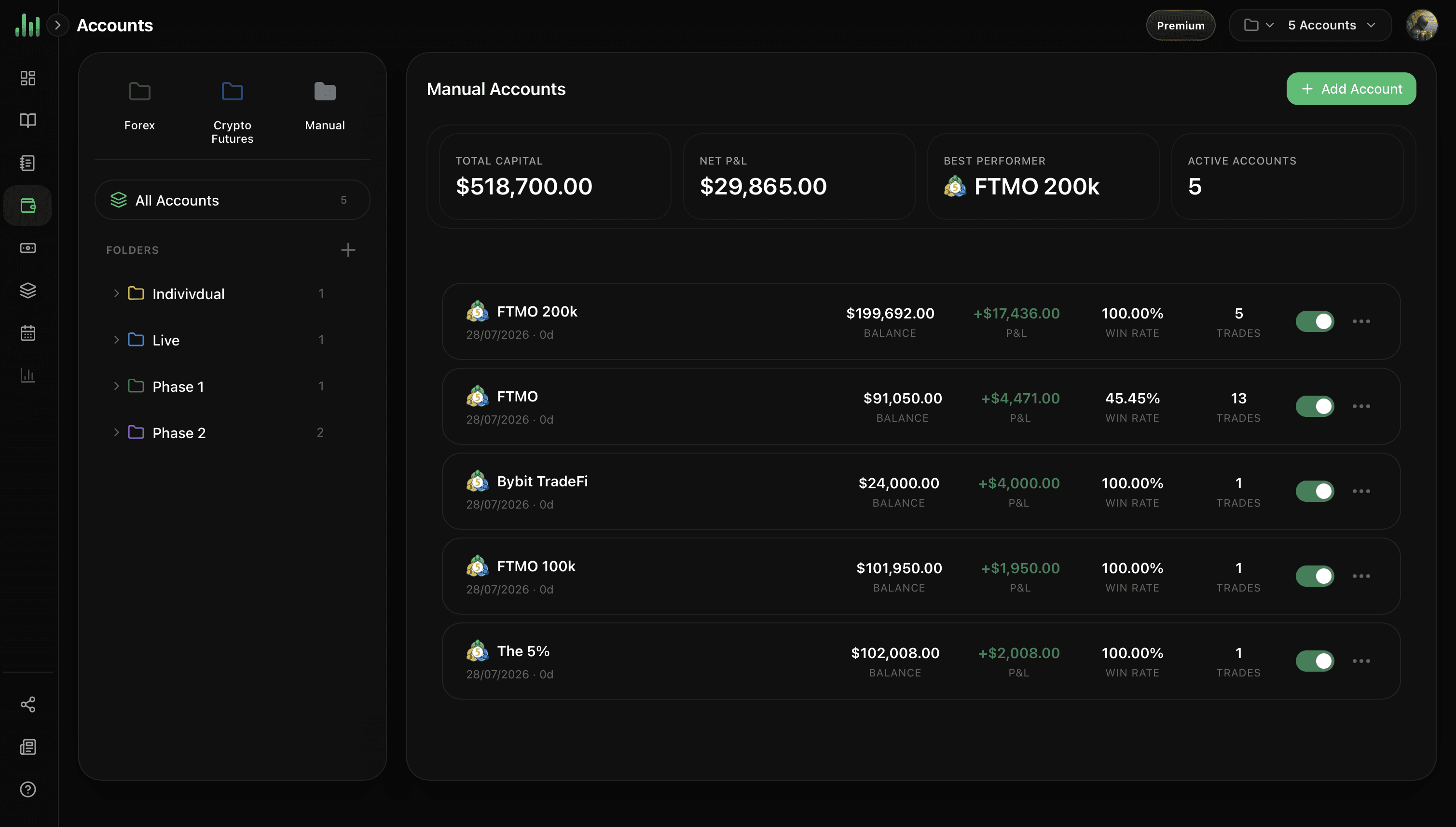
With BitStat Premium, you can sync an unlimited number of supported accounts under one plan, including Binance, Bybit, and MT5. Check whether your specific account type is supported for each source.

BitStat trading accounts with balances and performance
Account overview and choosing history to analyze
Weekly review

Connect the week’s results to specific decisions

If you often enter the next trade too late after a profitable one, add a note and screenshot to several such trades. At the end of the week, check whether this pattern repeats.

  1. Write down your rule before the session instead of trying to recall it after a loss.
  2. Revisit your trades and note where you followed or broke your plan.
  3. Choose one takeaway to check during the next period.
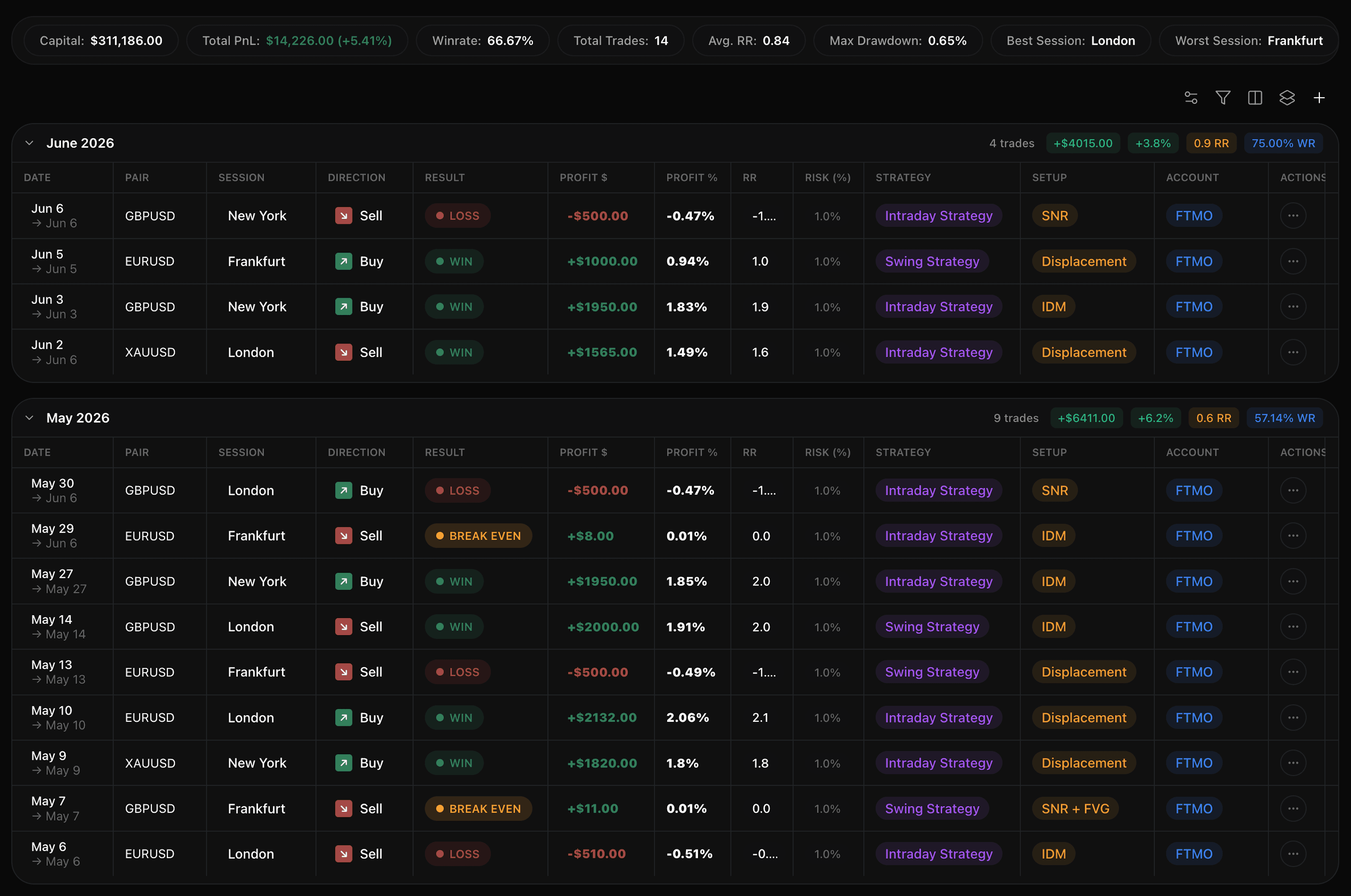
Four trades in the BitStat journal showing dates, instruments, and results
Example from the BitStat trade journal
Switching

Transfer the decision context along with the numbers

Before switching, decide which accounts, dates, and fields you need for analysis. Save a copy of your old journal so you can reconcile the results and keep your own notes.

  1. Check whether the specific account is compatible with a BitStat integration or prepare a sample for manual entry.
  2. Reconcile the trade count, time, instrument, volume, commissions, and result against the source.
  3. Keep your own rules and notes separately until you’ve checked which fields and materials can be exported.

First reconcile one exported period and check which fields and notes can be transferred.

FAQ

Frequently asked questions

What’s included in BitStat Free?
A manual journal, notes, screenshots, basic stats, P&L, and equity. API syncing for supported accounts requires Premium.

How many accounts can I connect to BitStat?
There’s no numerical limit on Premium. Each account must be compatible with a supported integration.
Do my notes from Edgewonk transfer automatically?
First check the export format on a small sample and reconcile it with the original journal.

Try BitStat with your trading week

Journal trades manually on Free, add notes and chart screenshots, and review basic stats. You can add syncing for supported accounts with Premium.