
Skip to content
Skip to comparison
Comparison

BitStat vs Tradeart

With BitStat, you can journal trades for free with no time limit. Add notes and chart screenshots to trades, and connect crypto exchanges, MT5, and cTrader on Premium.

BitStat

Tradeart

BitStat
Premium

$12 /month

Tradeart
Premium

$12 /mo.

Who it fits

Which trading journal best fits your trading?

BitStat

If you combine a crypto exchange with MT5 or cTrader, BitStat brings supported accounts together in one journal. BitStat’s manual backtests let you test strategies on historical data.

Tradeart

Tradeart has its own strategy testing tools: Backtester, Best Scenario, and AI Mentor.

What this comparison covers

Manual journaling and strategy testing

Choose the tool that fits your workflow

BitStat offers a manual journal with no time limit and separate manual backtesting on historical data. Tradeart offers Backtester for testing strategies on historical candles.

  • Journal trades manually on BitStat Free, with no time limit.
  • Check compatibility for the exchanges and broker accounts you need before syncing.
  • Compare BitStat manual backtesting with Tradeart tools such as Backtester.

Features

Pricing and account handling compared

Pricing and account handling compared
CriteriaBitStatTradeart
Start at no costFree with no time limit: manual journal, notes, chart screenshots, and P&L7 days of Premium with no card required; manual entries are mentioned in the journal description
Monthly price for the paid planPremium at $12/mo. under the current temporary offerPremium at $12/mo.
Annual price$96/year$96/year
Account limit on the paid planUnlimited supported connectionsUnlimited
Platforms you can connectSupported crypto exchanges, MT5, and cTraderMT5, cTrader, and DXtrade
Pricing

Plans and pricing for BitStat and Tradeart

BitStat

Free

$0

Free plan with no time limit

  • Manual trading journal
  • Basic stats
  • P&L and equity overview

Premium

$12 /month

The monthly price is a current offer. The annual plan costs $96. You can try Premium for 7 days without a card.

  • Unlimited supported connections
  • Automatic syncing for supported accounts

Tradeart

Premium

$12 /mo.

$96 per year.

  • Unlimited accounts
  • MT5, cTrader, and DXtrade connections
  • Tools for journaling and trading analysis

Pricing and trial terms

Prices checked on November 26, 2026. Monthly offers and annual prices are shown in the cards.

In practice

How BitStat differs from Tradeart in practice

Keep markets in one journal

If you combine crypto exchange trading with MT5 or cTrader, BitStat lets you keep supported sources in one journal. For sources without an integration, you can enter trades manually on Free.

  • Start with a manual entry at no cost.
  • Check whether the exchange or broker account is compatible before connecting.
  • Keep a note and chart screenshot alongside the trade result.

Exchanges

  • Binance
  • Bybit
  • WhiteBIT
  • OKX
  • MEXC

Trading platforms

  • MetaTrader 5
  • cTrader
Supported brokers

Connect period summaries to individual trade decisions

P&L summarizes the period, while the note and chart preserve context for a specific entry. Journal trades manually on Free or sync supported accounts on Premium.

  • Write down your trade thesis and add a chart.
  • After closing the position, save the result and takeaway.
  • Review individual trades alongside P&L over time.
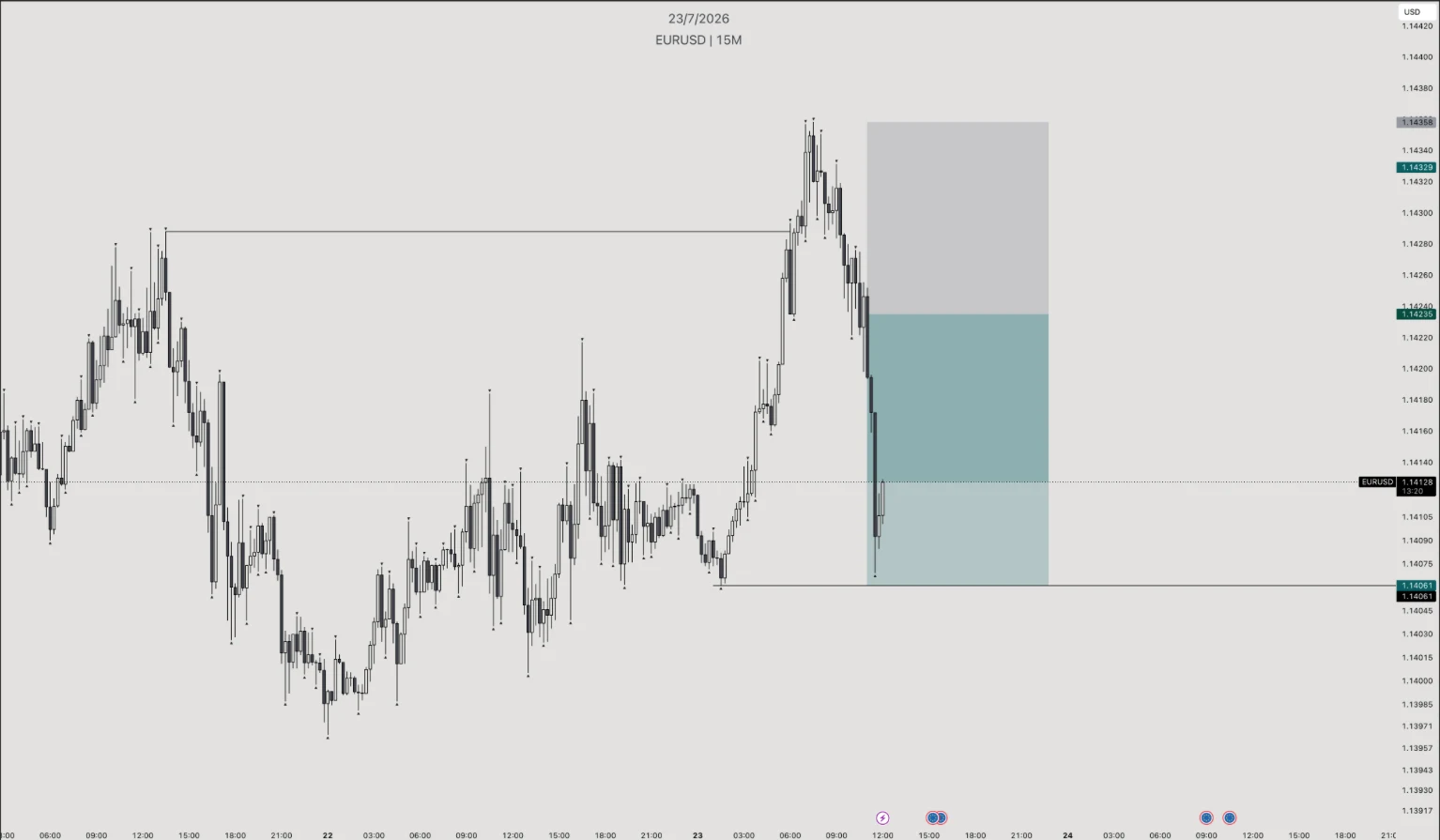
Saved note “EU Short” for a trade dated July 23, 2026Attached 15-minute EURUSD chart with the trade position marked
The note and chart show the context alongside the position result.

Evaluate pre-trade testing separately

BitStat offers manual backtesting: create a session on historical data, replay price movements, and assess P&L and drawdown on simulated trades. Tradeart lists Backtester, Best Scenario, and AI Mentor.

BitStat’s manual journal is not limited to a trial period.

Journal trades manually on Free indefinitely, add notes and screenshots, and review basic stats, equity, and P&L. Syncing supported accounts is available on Premium.

Weekly review

Scenario: a crypto trade and an MT5 position

Bring a supported crypto exchange trade and an MT5 position into one journal: sync accounts on Premium or enter trades manually on Free.

  1. Choose a source

    Check whether the exchange or broker account is supported for syncing.

  2. Capture the context

    Add a note and chart screenshot to an individual position.

  3. Compare the result

    Review the entries alongside P&L for the selected period.

Four trades in the BitStat journal showing dates, instruments, and results
Example from the BitStat trade journal
Switching

Switch over after checking your history

Before switching, check the export and reconcile one period with the original journal.

  1. Save the available reports and list the accounts you need.
  2. Match sources to BitStat integrations; enter remaining trades manually.
  3. On a few positions, reconcile the time, side, volume, commissions, and P&L.
  4. Check for duplicates before using the new stats.
FAQ

Frequently asked questions

Is Premium required to journal in BitStat?
No. You can journal trades manually on Free with no time limit; Premium is required to sync supported accounts.
Is manual backtesting available in BitStat?
Yes. Start a manual backtest on historical data: replay price movements, place simulated trades, and analyze P&L and drawdown.

Start building your trading history in BitStat

Journal trades manually on Free with no time limit. Upgrade to Premium to sync supported exchanges and broker accounts.